PERSONAL CENTURION
Sovereign Remote · You
Family Beneficiary Program
Introduce four colleagues who buy Centurion — earn one for someone you love.
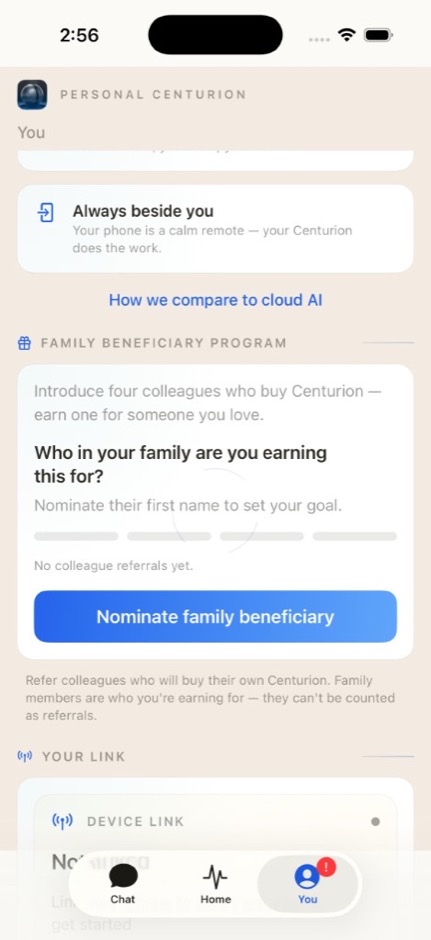
iPhone · You · Family Beneficiary

Earn a Sovereign · for family
How it works
- Nominate a family beneficiary — first name only. Often a spouse or family member who wants a Sovereign after seeing yours thrive.
- Refer colleagues — people who will buy their own Sovereign. Family members are who you are earning for; they cannot be counted as referrals.
- Four successful purchases — when four referred colleagues complete their buy, you earn one complimentary Centurion for your nominated family beneficiary.
- Start again — cycles reset without limit. Nominate a new family beneficiary and keep going.
At a glance
- 4 colleague purchases = 1 family Centurion
- Referrals: colleagues only (non-family)
- Reward: complimentary Centurion for your nominated family member
- Manage it in Sovereign Remote under You → Family Beneficiary Program
Where you manage it
Open Sovereign Remote on your iPhone, go to the You tab, and use the Family Beneficiary Program card. There you can nominate (or change) your beneficiary, refer colleagues, and track pending versus purchased progress toward your family Centurion.
A referral counts when Centurion operations confirms the colleague's purchase — not the moment you add their name in the app.
Important rules
- Family members are beneficiaries, not referral targets — listing family as a colleague referral is not allowed.
- You must attest that each referred colleague is not a family member when you add them.
- The complimentary unit is for the family beneficiary you nominated for that cycle.
- Program details may be updated; the authoritative progress always shows in your Remote app when linked to your Sovereign.
Talk to us
Questions about a referral or a family Centurion you have earned? Write to hello@1human1ai.com or use Ask Adrian in the help center.